
Any out-of-home estate.
The formats differ. The journey from discovery to collection does not.
Digital screens sold by day or month across a network, with content scheduling and campaign monitoring already defined as services against the asset template.
A large estate across cities, sold by site and fortnight. Inventory, availability and occupancy are the whole business — and the proposal has to be built from real assets.
High asset counts, repeated formats and heavy field work. Templates carry the printing, fabrication and installation tasks so every deal inherits them, and QR identity keeps site visits on the record.
Static and digital together, with a sales team that needs the commercial picture and an operations team that needs the delivery one.
Nine parts of one platform.
Each is useful on its own. Together they are the connected DOOH journey.
Controlled public inventory discovery.
Explore →Assets, locations, availability and details.
Explore →QR-powered asset identification in the field.
Explore →Capture and manage buyer requirements.
Explore →Commercial offers, versions and responses.
Explore →Turn sold business into execution.
Explore →Tasks, readiness and field activity.
Explore →Invoices, payments and outstanding.
Explore →Revenue, occupancy, pipeline and attention.
Explore →Eight stages, one path.
Not a set of isolated tools — a single route a piece of business travels, with a record at every stage.
- 01DiscoverMarketplaceA buyer finds publicly visible inventory.
- 02RequestRFPThe buyer submits their requirements.
- 03SelectInventorySuitable assets are identified.
- 04SellProposalA commercial offer is created and managed.
- 05ConvertCampaignAccepted business becomes an executable campaign.
- 06ExecuteOperationsAssets, tasks and progress are managed.
- 07InvoiceFinanceBilling connects to the commercial workflow.
- 08CollectPaymentsCollected, outstanding and overdue are visible.
Make your DOOH inventory discoverable.
Give buyers a modern way to discover selected advertising inventory while media owners remain in control of what is publicly visible.
- Media owners control which assets are publicly visible
- Search and filter available inventory
- Explore inventory by location, with map discovery where coordinates exist
- View asset specifications, availability and relevant pricing
- Request a proposal directly from an opportunity
Turn buyer requests into business opportunities.
Bring RFP requirements into a structured commercial workflow and move them toward suitable inventory and proposals.
- Capture buyer requirements
- Organize opportunity information
- Review campaign requirements
- Identify suitable inventory
- Progress opportunities toward proposals
The actual product.
Not illustrations — these are the screens your team would use.
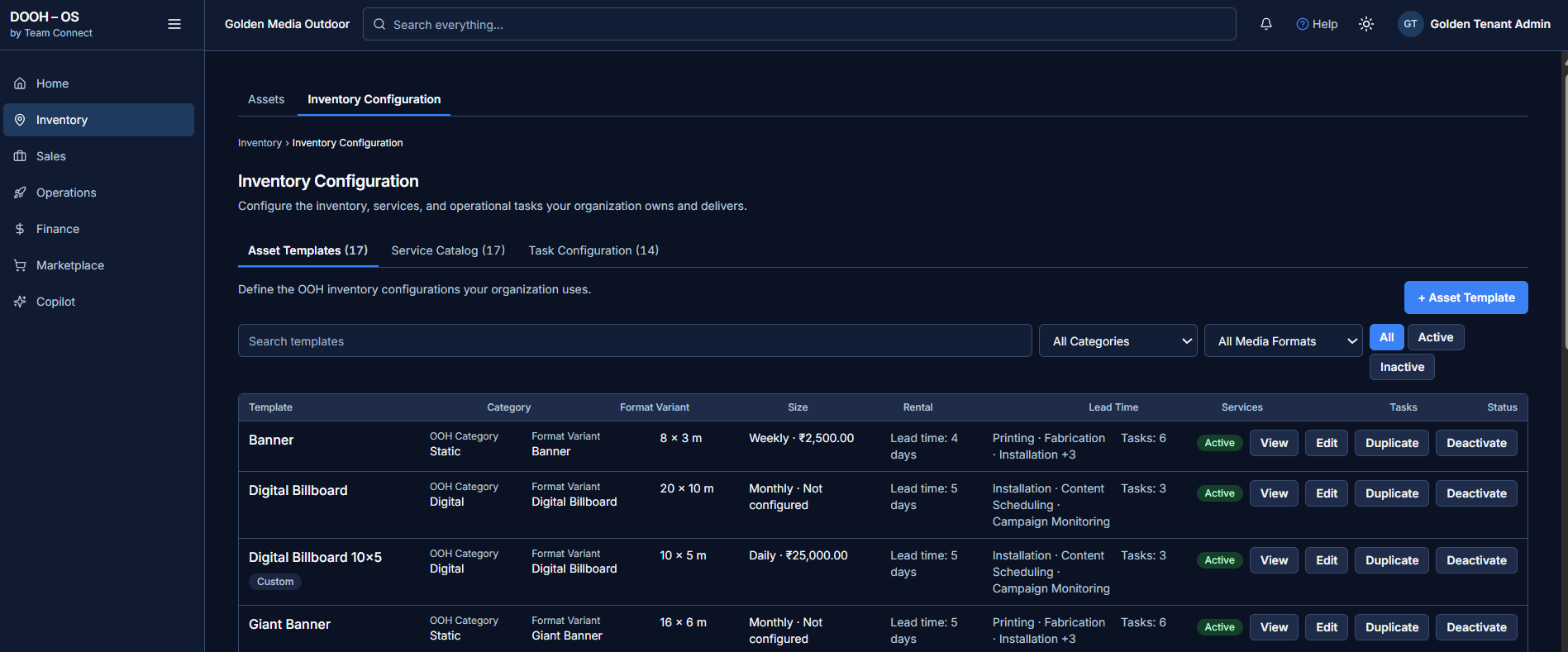
Asset templates carry category, format variant, size, rental frequency and value, lead time, attached services and task counts — reusable across every deal.
See OOHYantra in action.
Explore how Team Connect can simplify the way your DOOH business manages inventory, sales, campaigns, operations and finance — on a walkthrough using your own formats.
Request a Demo →