
Inside OOHYantra / The platform
Your entire media business.
One clear picture.
Connect the locations you manage, the opportunities you win and the campaigns you deliver. One workspace for the people behind outdoor media.
Built for how DOOH
actually gets sold.
Everything below is in the current product — the screenshots further down are the same screens.
Media owners decide which assets are publicly discoverable. Buyers search, filter, explore by location and request a proposal from an opportunity.
Map, List and Card views over the same estate, with assets positioned on the map wherever latitude and longitude are recorded.
A unique QR identity per asset lets field engineers open the right record on site and report maintenance or incidents against it.
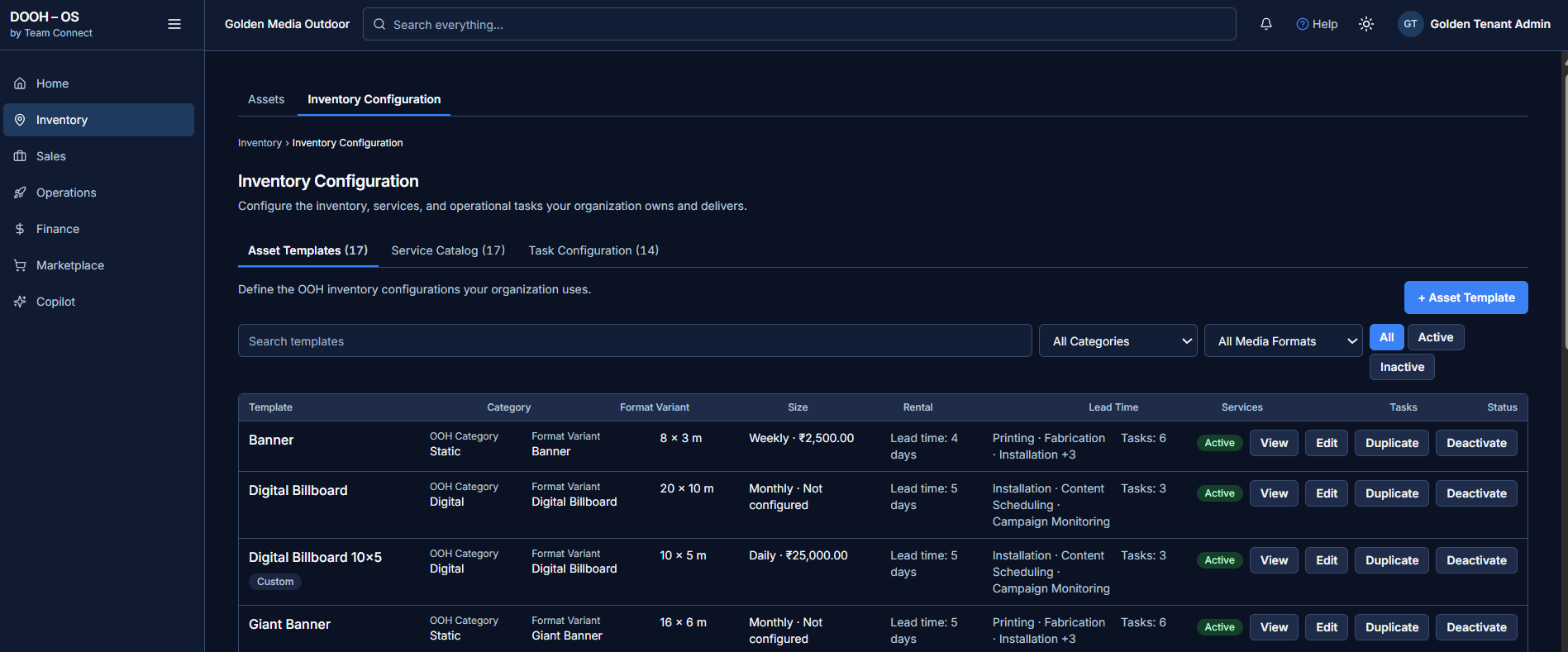
Templates, services and tasks standardize how inventory is configured and delivered — category, size, rental terms, lead time and the work each format needs.
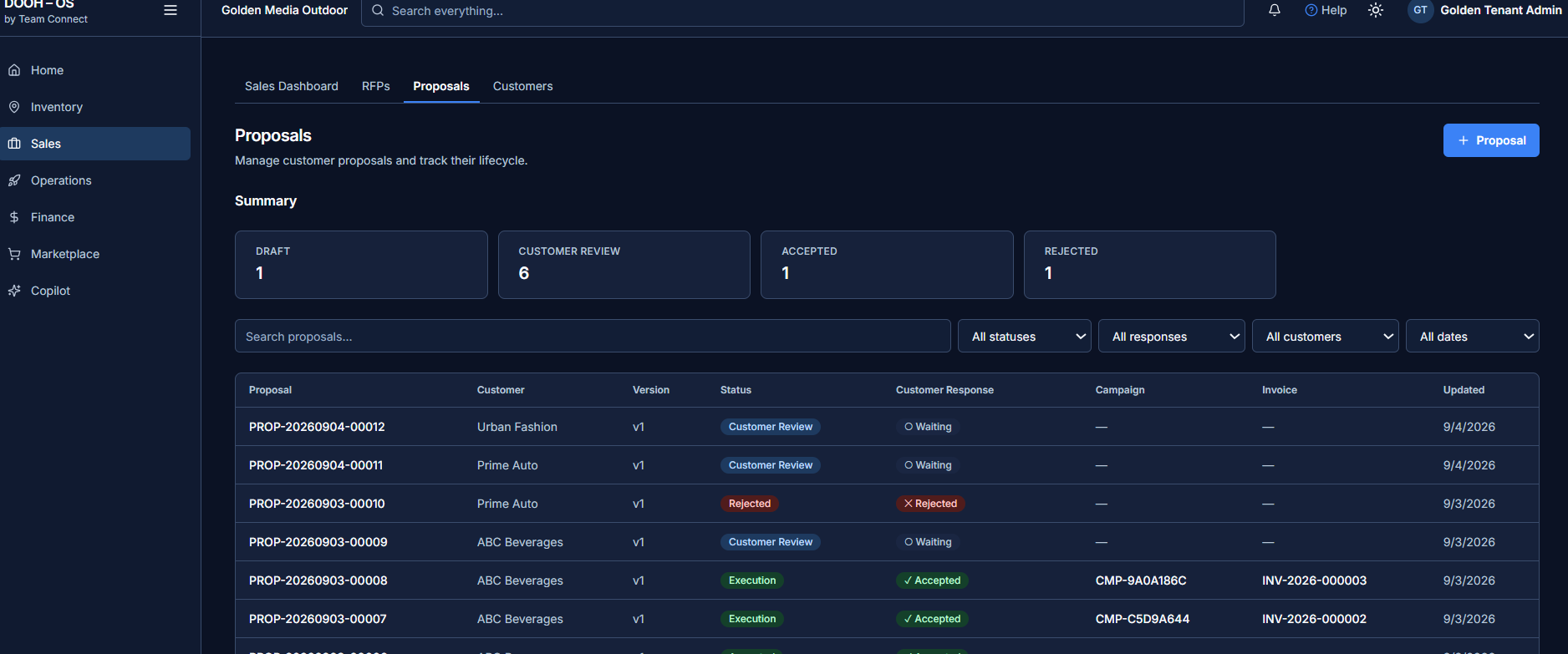
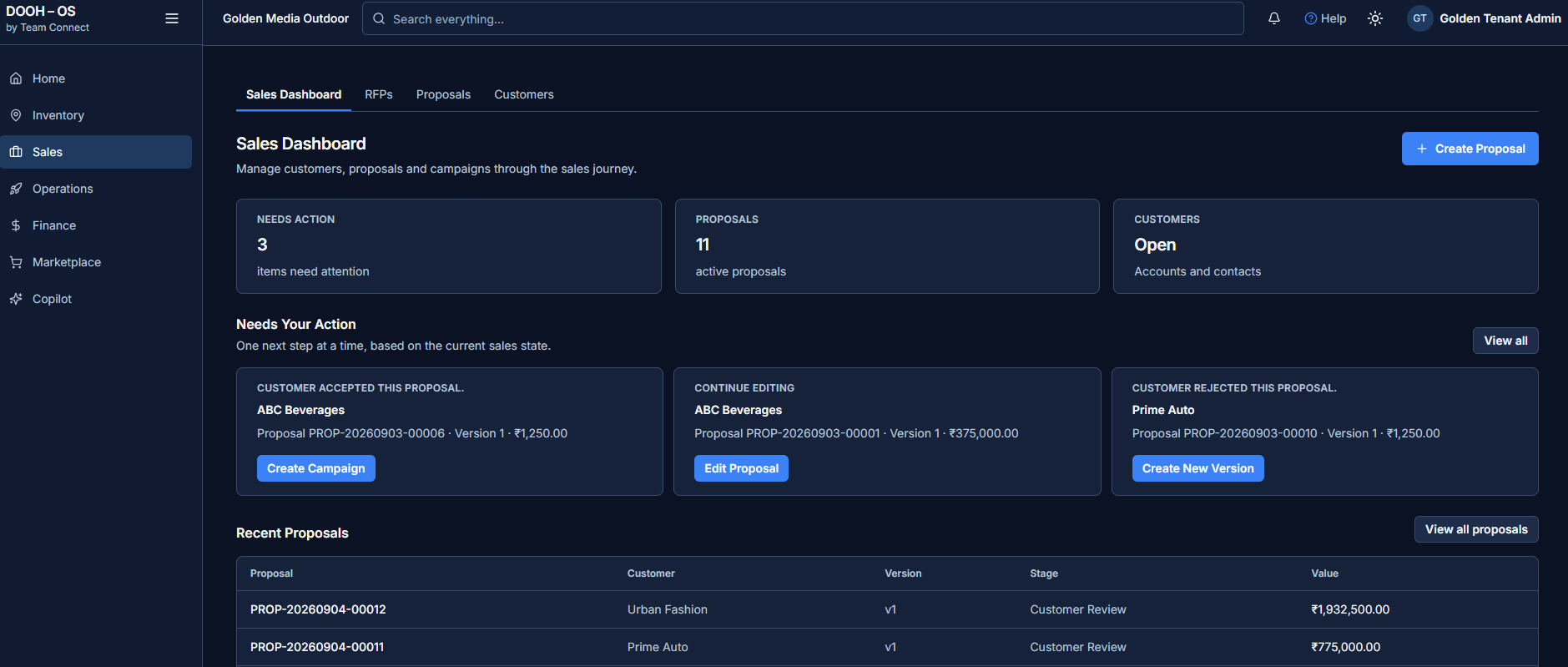
RFP, proposal, campaign and invoice records connect to one another, so the history of a deal can be reconstructed rather than remembered.
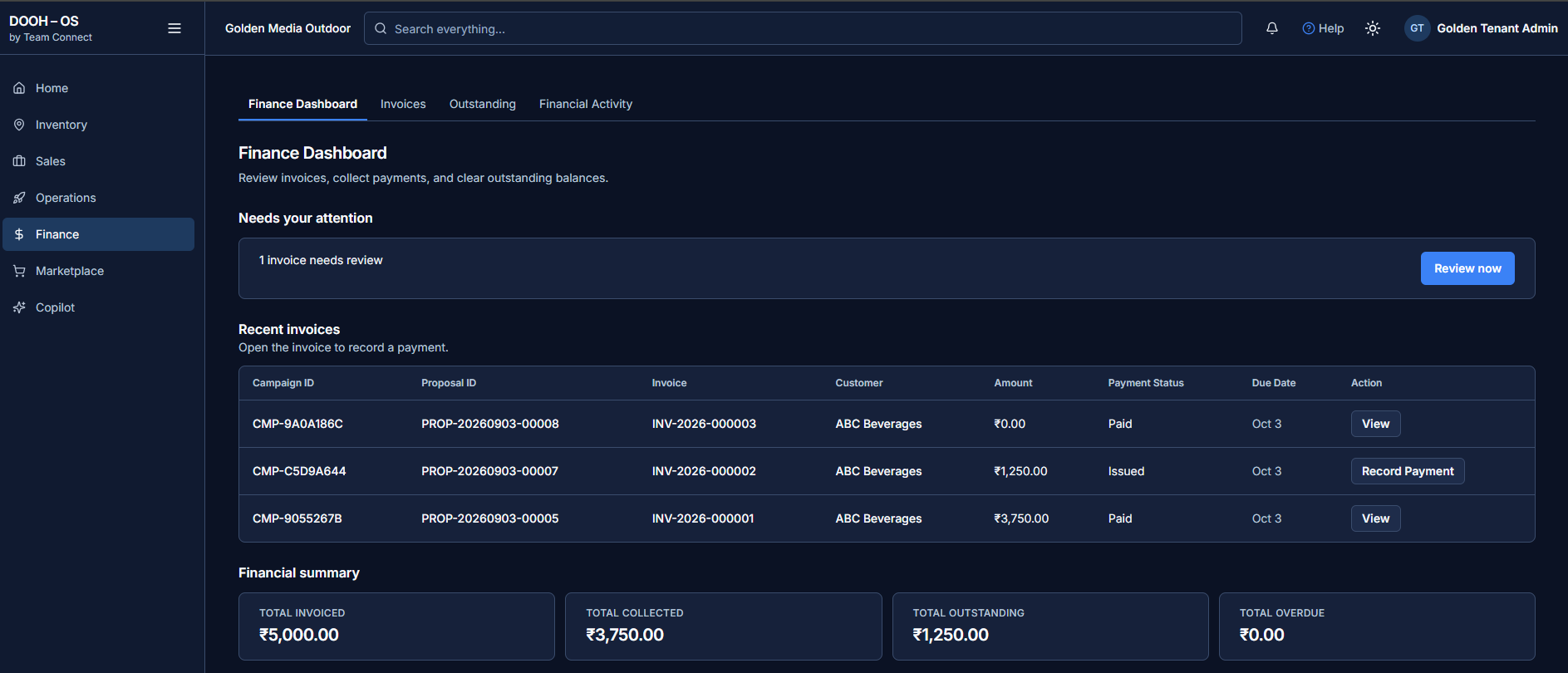
Invoices carry their campaign and proposal, payments are recorded in place, and collected, outstanding and overdue amounts are read together.
Eight stages, one path.
Not a set of isolated tools — a single route a piece of business travels, with a record at every stage.
- 01DiscoverMarketplaceA buyer finds publicly visible inventory.
- 02RequestRFPThe buyer submits their requirements.
- 03SelectInventorySuitable assets are identified.
- 04SellProposalA commercial offer is created and managed.
- 05ConvertCampaignAccepted business becomes an executable campaign.
- 06ExecuteOperationsAssets, tasks and progress are managed.
- 07InvoiceFinanceBilling connects to the commercial workflow.
- 08CollectPaymentsCollected, outstanding and overdue are visible.
Make your DOOH inventory discoverable.
Give buyers a modern way to discover selected advertising inventory while media owners remain in control of what is publicly visible.
- Media owners control which assets are publicly visible
- Search and filter available inventory
- Explore inventory by location, with map discovery where coordinates exist
- View asset specifications, availability and relevant pricing
- Request a proposal directly from an opportunity
Know every asset. Know its availability.
Manage the organization's DOOH media estate with multiple ways to find and understand assets.
- Map, List and Card views of the same estate
- Search by asset name, code, city, address or tags
- Asset imagery and detailed records
- Asset status and commercial availability held separately
- Direct actions from an asset toward a proposal or work
Give every physical asset a digital identity.
QR codes connect a physical DOOH asset with its digital record, so what happens in the field lands against the right asset.
- A unique QR identity per asset
- Fast identification by field engineers
- The correct asset record opened from the field
- Maintenance reported against the identified asset
- Incidents reported against the identified asset
Turn buyer requests into business opportunities.
Bring RFP requirements into a structured commercial workflow and move them toward suitable inventory and proposals.
- Capture buyer requirements
- Organize opportunity information
- Review campaign requirements
- Identify suitable inventory
- Progress opportunities toward proposals
Build smarter DOOH proposals.
Create customer-ready commercial proposals from customers, contacts, inventory, pricing and services — then follow what the customer does with them.
- Customer and contact selection
- Asset selection with pricing and services
- Proposal versions, status and history
- Customer response tracked per version
- Accepted proposals progress to a campaign
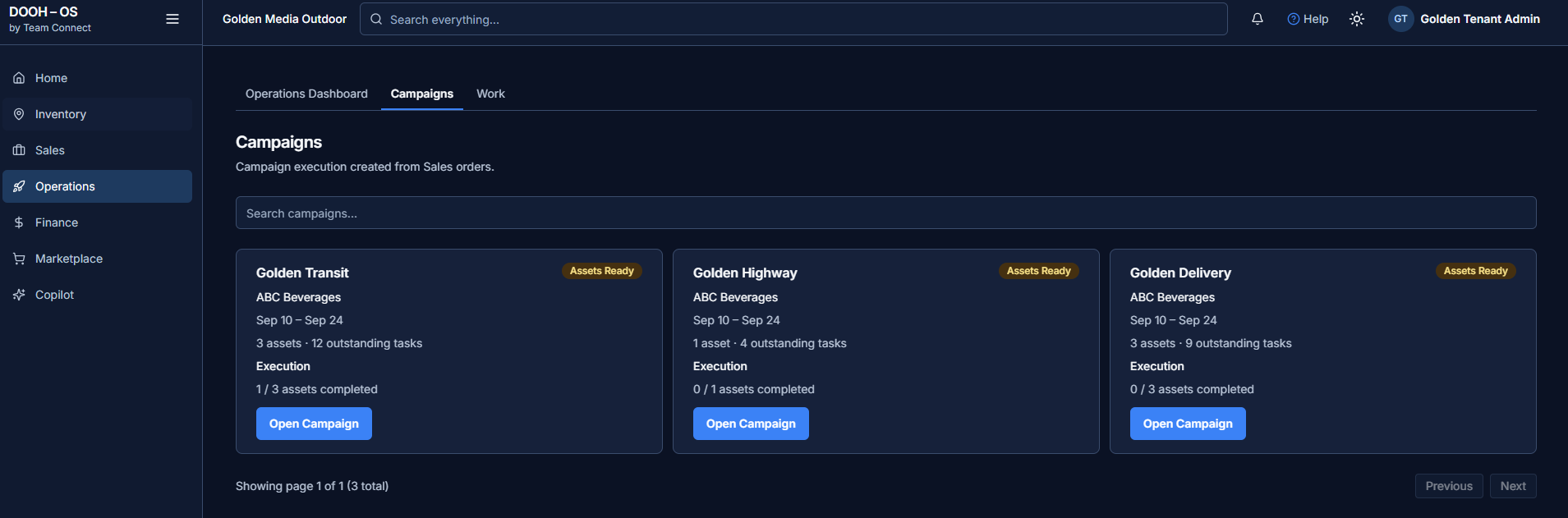
Turn won business into executable campaigns.
Move from accepted commercial business to a campaign with clear asset and execution visibility.
- Campaign creation from sold business
- Start and end dates with assigned assets
- Asset readiness before the campaign runs
- Outstanding tasks per campaign
- Execution progress as assets completed versus total
Connect campaigns with work on the ground.
Keep the operational activities needed to prepare and deliver campaigns visible, and connected to the business context they belong to.
- Operational activities and tasks
- Outstanding work visibility
- Campaign execution activities
- Asset-linked field activity
- QR-supported maintenance and incident reporting
Keep delivery and cash flow connected.
Connect commercial activity with invoices and payment status, so teams see what has been billed, what has been collected and what remains outstanding.
- Invoice management with proposal and campaign relationships
- Payment recording from the invoice itself
- Collected amounts
- Outstanding amounts
- Overdue amounts
Know what needs
your attention.
One view of what is selling, what is booked, what is running, and what needs a decision — a management-level read on performance and operational risk.
Request a Demo →The actual product.
Not illustrations — these are the screens your team would use.
Asset templates carry category, format variant, size, rental frequency and value, lead time, attached services and task counts — reusable across every deal.
Eight reasons it holds together.
Each one is a property of the platform, not a promise about it.
Media owners decide which inventory is publicly discoverable.
Assets sit on a map wherever latitude and longitude are recorded.
QR codes connect physical assets with digital records for field teams.
RFP, proposal, campaign and invoice records connect to one another.
Templates, services and tasks standardize how inventory is configured and delivered.
Campaigns expose assets, readiness, outstanding tasks and progress.
Commercial records connect through campaign and invoice relationships.
Inventory, sales, execution and finance in one operating environment.
See OOHYantra in action.
Explore how Team Connect can simplify the way your DOOH business manages inventory, sales, campaigns, operations and finance — on a walkthrough using your own formats.
Request a Demo →